
Parcels: Track Online Orders
ParcelsAppShopping
3.4602.00 Reviews
- Version
- 3.0.10
- Installs
- 1.00M
- Age Rating
- Everyone
Screenshots
Our Review of Parcels: Track Online Orders
 Analysis by Appyee
I’m careful about package-tracking apps because a tracking number can reveal more than the whereabouts of a parcel: it can also connect a purchase to a delivery routine or a gift you’re trying to keep secret. My impression of Parcels: Track Online Orders is that its main appeal is practical consolidation: bringing several shipments into one place rather than asking you to revisit each shop or carrier. That convenience is useful, but I’d still treat a tracking app as a focused tool, not as a reason to share more personal information than the task requires.
A useful middle layer between shops and carriers
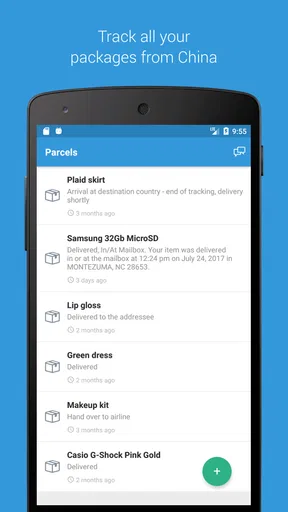
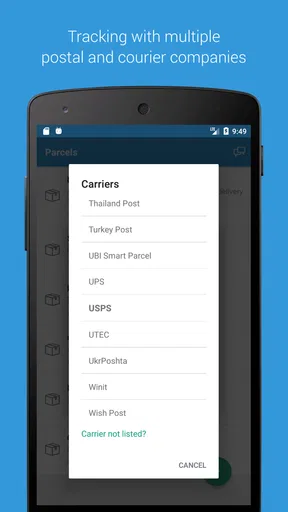
In the shopping category, ParcelsApp’s app sits between retailer order pages and individual carrier trackers. The developer, ParcelsApp, has built a service aimed at following parcels from a mixture of shops and delivery companies, including orders from eBay, Temu, Shein and Shopee, as well as UPS and FedEx. That range is the point: if your purchases come from different places, you can check one tracking list instead of remembering which website handles each shipment.
I find that distinction important. A retailer’s own order page can be the better choice when I need to change an order, contact the seller or resolve a payment issue. A carrier’s tracker is usually the more direct place to check details about that carrier’s delivery. Parcels is most useful as a viewing hub when the question is simply, “Where are the parcels I’m waiting for?” It doesn’t replace the store or delivery company when a shipment needs intervention.
What to check before adding a shipment
My sensible routine would be to add only the tracking number needed to follow an order, then check that the detected shipment matches the purchase I have in mind. A number copied from an email can be easy to confuse with another order, especially around busy shopping periods. Giving each parcel a clear nickname, such as “return label” or “gift,” can help distinguish them without relying on memory or repeatedly opening the original order email.
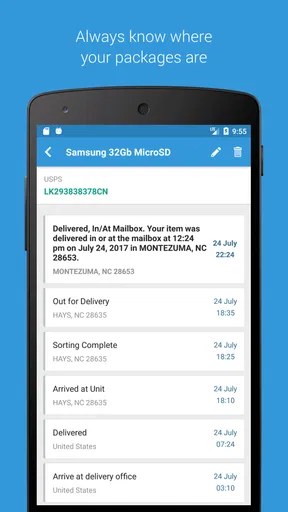
I also wouldn’t assume that a combined tracker has the same information as every carrier’s own system. Updates depend on the shipment and the tracking information made available along its route, so an occasional gap or delay is a reason to check the carrier directly before making plans around a delivery time. The app is most reassuring as a convenient overview, not as a guarantee that every status change will appear instantly.
Who will get the most from it
This kind of setup makes the most sense for someone who often has several orders moving through different shops or delivery services. If I’m waiting on a household item from one retailer and a personal order from another, keeping their tracking in one list can reduce the small but irritating task of hunting through inboxes. The app is also a reasonable fit for people who want a quick status check without learning a separate carrier interface for every parcel.
On the other hand, someone who rarely orders online may find it simpler to use the tracking page already included in a retailer’s email. I’d also choose the carrier’s own service when I need the most direct route to delivery-specific actions or support. Parcels is less compelling if a single shop already provides all the tracking I need, or if I prefer not to place shipment details in another app.
Everyday use, with a little caution
Picture a weekday morning when I’m expecting two deliveries: one is a routine purchase, while the other is a present I don’t want to overlook. Instead of searching my email while getting ready, I can check the parcel list and use the nicknames to tell them apart. If a status changes, a notification can spare me from repeatedly opening the app. For a surprise gift, though, I’d consider whether notifications displayed on a shared or visible device might give away the delivery; the practical choice is to keep alerts suited to the situation rather than enable every possible ping.
That illustrates a useful trade-off: alerts can reduce checking, but too many notifications can become background noise. I’d start with only the milestones that affect what I need to do, such as knowing a parcel is out for delivery, then adjust if the reminders are either excessive or not useful enough. A tracking notification is a prompt to check the latest status, not a substitute for arranging a delivery or confirming details with the carrier.
Ratings, cost and practical fit
The app is free to install, with in-app purchases listed from $0.99 to $5.99 per item. I’d try the free version for my ordinary tracking needs before deciding whether any paid option is worthwhile; the useful question is whether the features I actually use justify spending, not whether I can add every available extra. The audience rating is Everyone, and it has passed one million installs. Its average is 3.4 from around 23,000 ratings, with 602 written reviews, so the reception is mixed rather than an unqualified endorsement.
That rating gives me a reason to keep expectations measured. A tracker’s day-to-day usefulness depends partly on whether it recognizes a shipment and receives timely status updates, and those details can vary from parcel to parcel. If an order appears stalled, I’d compare the app’s status with the retailer’s order page or the carrier’s own tracking before concluding that the package is lost. That extra check is a small inconvenience, but it prevents an overview tool from becoming the sole source for an important delivery decision.
The current version is 3.0.10 and it requires Android 8.0 or later. It was released on July 28, 2017, and remains a free shopping app with optional in-app purchases. Those details make it straightforward to judge basic compatibility and cost, but they don’t answer every personal trust question. I would review the permissions and privacy choices shown on my own device before use, and I’d avoid assuming that one tracking workflow requires access to unrelated information.
Unpacking the Features
Upon downloading Parcels: Track Online Orders, I was greeted with a clean and intuitive interface. It feels like the developers really thought about user experience. The app supports tracking for a wide range of carriers, which is a life-saver for anyone who shops from multiple online stores. From USPS to DHL and everything in between, this app has you covered.
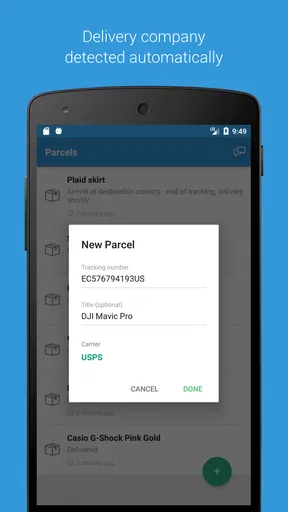
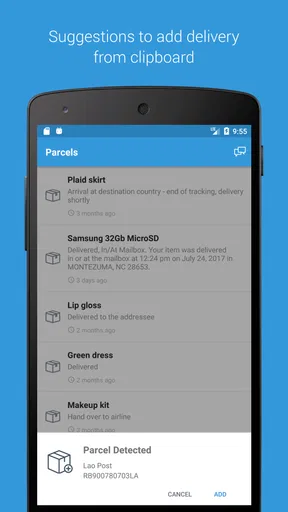
One of the standout features for me is the ability to simply copy a tracking number from your email or clipboard, and the app automatically detects it. No more juggling between apps or typing out long strings of numbers—definitely a win in my book!
Custom Notifications
Another feature I found super handy is the customizable notifications. You can set it up to alert you at different stages of the delivery process. Personally, I like getting a ping when my package is out for delivery and once it’s delivered. It just adds that extra layer of reassurance for us forgetful types.
Sync Across Devices
If you’re like me and use multiple devices throughout the day, you’ll appreciate the sync feature. Your tracking information is available on your phone, tablet, or even your desktop. It’s seamless and just makes life easier, especially when you’re on the go.
Putting It to the Test
I decided to put the app to the test with a few orders I had on the way. Adding a new package was a breeze, and I loved how I could nickname my orders (like "New Sneakers" or "Birthday Gift for Mom") to keep track of them easily. The updates were prompt, and I didn’t experience any lag or missed notifications.
There's also a nifty map feature that shows the progress of your delivery. Watching my package make its way across the country was oddly satisfying, and it’s a great way to visualize where your stuff is.
Final Thoughts
Overall, Parcels: Track Online Orders delivers on its promises. It’s user-friendly, packed with useful features, and, most importantly, reliable. Whether you’re an occasional online shopper or a serial e-commerce enthusiast, this app is a must-have to keep your deliveries in check.
So next time you’re about to tear your hair out waiting for a package, give Parcels a shot. It might just save you a headache or two. Happy tracking!
Verdict
Strengths of Parcels: Track Online Orders
- Simple and intuitive user interface.
- Supports tracking for multiple couriers.
- Real-time push notifications.
- Barcode scanning for quick entry.
- Customizable tracking labels.
Limitations of Parcels: Track Online Orders
- Contains occasional ads.
- Limited offline functionality.
- Requires account for full features.
- No dark mode available.
- In-app purchases for premium features.
Similar Picks in This Category
View All
SHEIN-Shopping Online
Roadget Business PTE. LTD.4.8

Amazon Shopping
Amazon Mobile LLC4.4


Mercado Libre: Compras online
Mercado Libre4.8

Wish: Shop and Save
Wish US Holdings LLC4.7

Alibaba.com - B2B marketplace
Alibaba Mobile4.4
Frequently Asked Questions
What is Parcels: Track Online Orders, and how does it work?
Parcels: Track Online Orders is a mobile app designed to help users track their online purchases across multiple carriers. By inputting your tracking number, the app aggregates information from various delivery services, providing real-time updates on your package's status and location. It supports a wide range of global and regional carriers.
Is Parcels: Track Online Orders compatible with all shipping carriers?
Parcels: Track Online Orders is compatible with a vast number of shipping carriers worldwide, including popular ones like UPS, FedEx, DHL, and USPS, as well as numerous regional and local services. However, it’s advisable to check the app's carrier list to ensure your specific carrier is supported before downloading.
Does Parcels: Track Online Orders require any personal information to use?
To use Parcels: Track Online Orders, you generally only need to input your tracking number, which is provided by the retailer or carrier. The app does not typically require personal information such as your name or address, ensuring a level of privacy and security for its users.
Are there any costs associated with using Parcels: Track Online Orders?
Parcels: Track Online Orders is free to download and use, providing basic tracking features without charges. However, there may be premium features available within the app that offer enhanced tracking capabilities or an ad-free experience, which could incur additional costs.
How reliable is the tracking information provided by Parcels: Track Online Orders?
The reliability of tracking information in Parcels: Track Online Orders depends on the data provided by the shipping carriers. The app aggregates this data and displays it in a user-friendly format. While generally accurate, occasional delays or discrepancies can occur due to carrier reporting practices.
